

Your MT4 & MT5 trading journal, analytics, and reports
in one focused workspace.
NuvoraSync is built for MetaTrader users who want to review their own trading data in one clean workspace — from manual trades to Expert Advisors and multi-account setups.
Built for
- MetaTrader traders
- EA users
- Multi-account workflows
Includes
- Dashboards & journal notes
- EA analytics & custom dashboards
- Telegram account activity notifications
- Automated PDF reports
Read-only by design
- No trade execution
- No signals
- No investment advice
Capabilities
Everything you need to understand your trading.
Real-time MetaTrader sync, dashboards, EA analysis, journaling and Telegram notifications in one focused product.
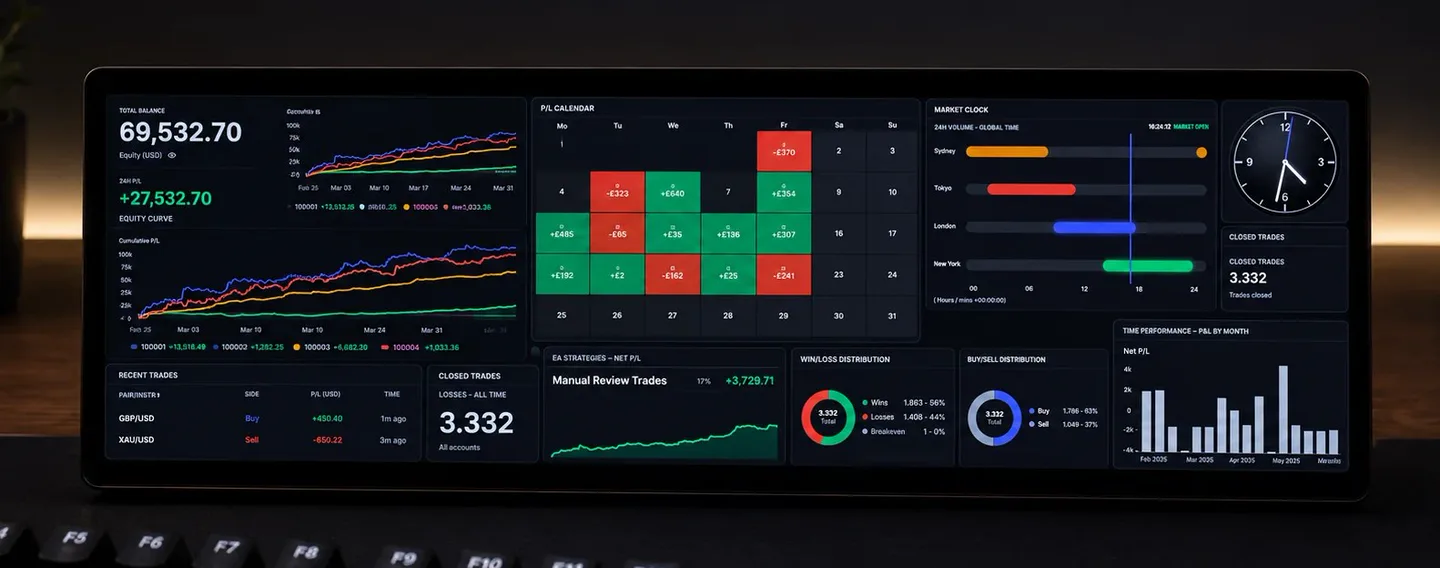
Dashboard
Balance, equity, daily P/L and recent trades in one premium overview — ready the moment you open NuvoraSync.
ExploreCustom Dashboard
Drag, drop and resize 25+ widgets across multiple dashboards — then project any layout full-screen in TV Mode.
ExploreJournal
Notes, plans, ratings, screenshots and a review calendar — built for honest post-trade analysis, not just record-keeping.
ExploreAccounts
Switch between a clean card view and a dense list, with balances, equity, P/L and win rates across every account.
ExploreTrades
A fast, filterable trade history with search, symbol, side, magic and date filters, custom columns and sorting.
ExplorePositions
See every open trade with live floating P/L, current price and a running account total.
ExploreAnalytics
Performance curves, time-of-day and weekday breakdowns, long vs short and per-symbol P/L — analysis that changes how you trade.
ExploreEA Analytics
Group trades by magic number or comment, review each strategy on its own card, and compare two EAs side by side.
ExploreAutoSync
Drop the NuvoraSync EA on MT4 or MT5 and your trades, positions and balances flow in automatically — history included.
ExploreTelegram
Per-event templates, dynamic emoji rules and a live phone preview — get notified the instant your own trades open or close.
ExploreReports
Build a branded performance report, preview it live, and have it delivered to email and Telegram automatically.
ExploreCalculator
Position size, risk, compounding and projections — fast calculators that update as you type.
ExploreBacktesting
Drop an MT4 or MT5 backtest report and get a clean breakdown — then compare runs side by side.
ExploreSuggestions
Send the team a feature idea, track its status, and watch the product grow around how you actually trade.
ExploreSecurity
Modern authentication, two-factor login, password recovery and strictly per-user data isolation.
ExploreConnect MetaTrader once. Sync everything automatically.
Install the NUVORA AutoSync Expert Advisor on MetaTrader 4 or 5, paste your API token, and your trades, accounts, positions and analytics flow into NuvoraSync on their own — no manual imports.
MT4
MetaTrader 4
MT5
MetaTrader 5
The workspace
See NuvoraSync in action
Real screens from the product — scroll through the dashboard, analytics, EA analytics, reports and Telegram notifications.
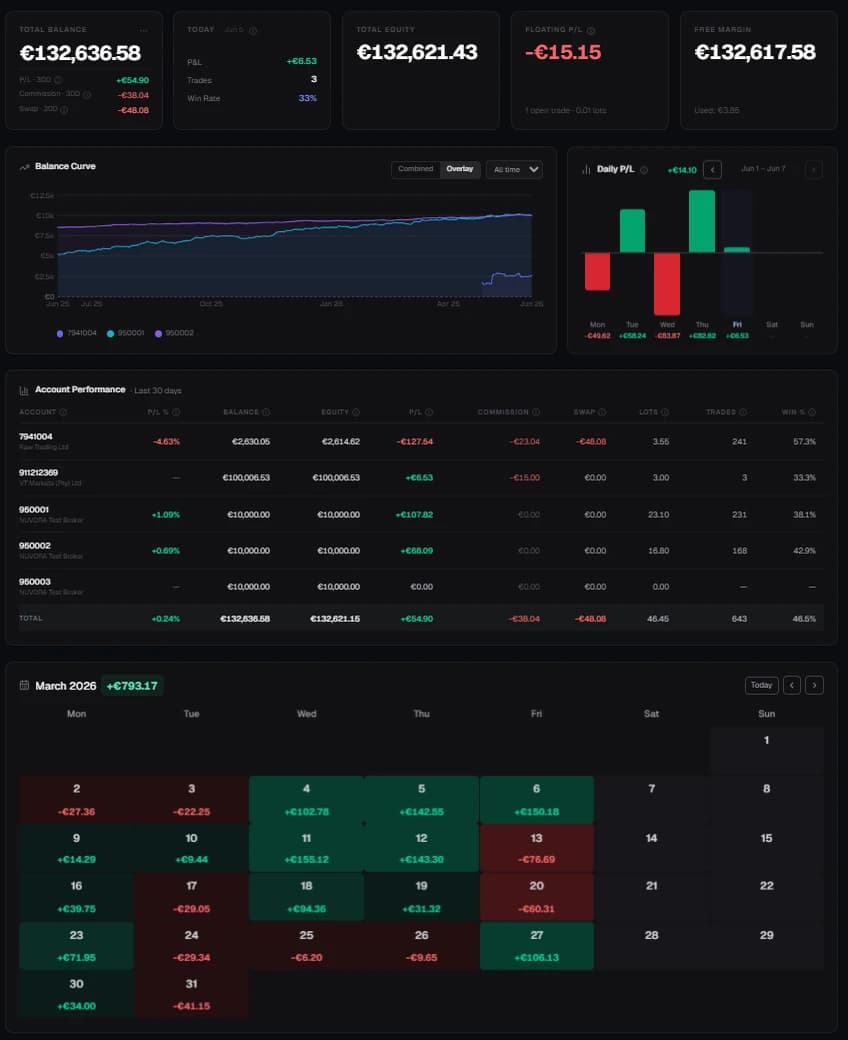
Live trading dashboard
Track accounts, equity, daily performance and open risk in one focused view.
- Account and portfolio overview
- Daily P/L and equity movement
- Open positions and sync status
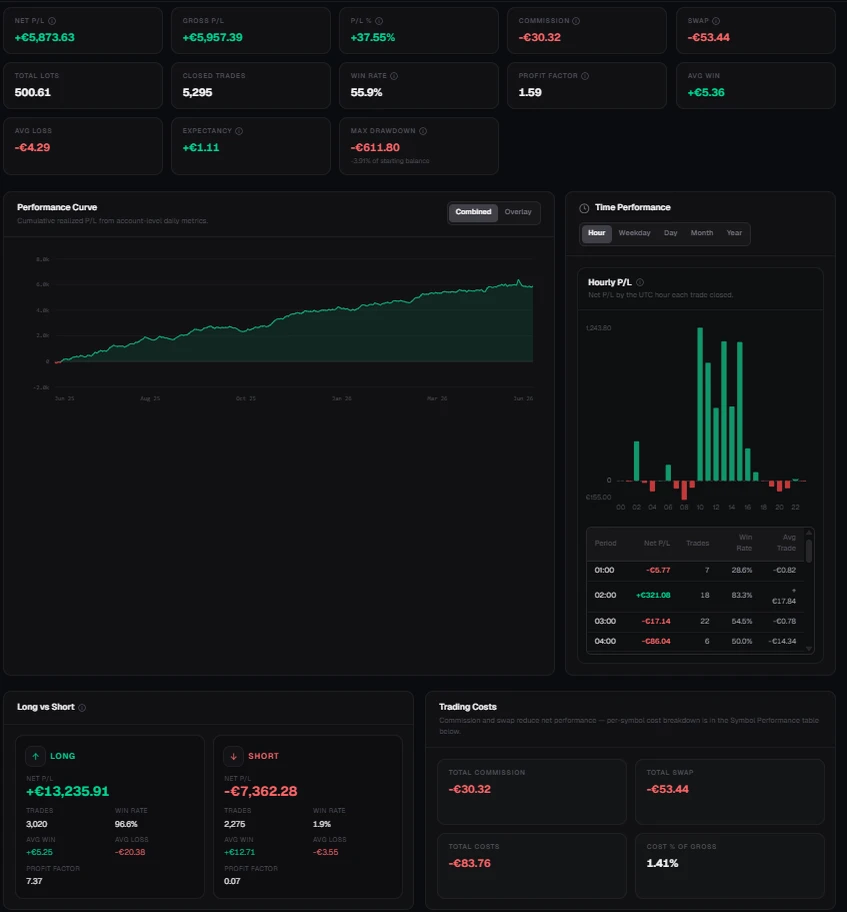
Performance analytics
Understand your trading performance across time, symbols, setups and account behaviour.
- Daily, weekly and monthly P/L
- Time performance and trade distribution
- Broker-date aligned metrics
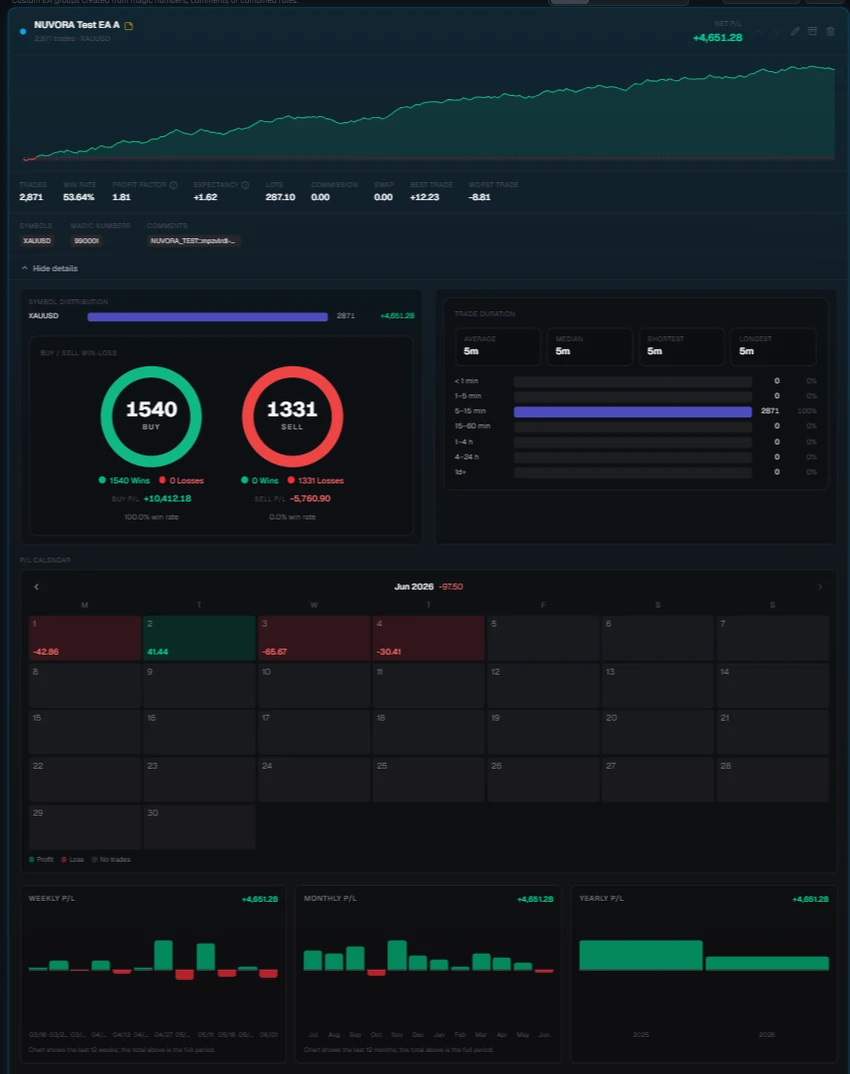
EA strategy analytics
Compare automated strategies by magic number, comment, symbol and performance curve.
- Strategy grouping and comparison
- P/L calendar and period breakdowns
- Curve, win/loss and trade-duration insights
Automated PDF reports
Generate weekly, monthly or yearly reports with custom sections and delivery options.
- Download, email or Telegram delivery
- Custom report templates
- P/L calendar, charts and trade tables
Telegram account activity notifications
Get notified in Telegram when your own MetaTrader trades open or close, plus your scheduled report deliveries.
- Custom message templates
- Separate report bot support
- Pro-gated delivery controls
Live trading dashboard
Live trading dashboard
Track accounts, equity, daily performance and open risk in one focused view.
- Account and portfolio overview
- Daily P/L and equity movement
- Open positions and sync status
Performance analytics
Understand your trading performance across time, symbols, setups and account behaviour.
- Daily, weekly and monthly P/L
- Time performance and trade distribution
- Broker-date aligned metrics
EA strategy analytics
Compare automated strategies by magic number, comment, symbol and performance curve.
- Strategy grouping and comparison
- P/L calendar and period breakdowns
- Curve, win/loss and trade-duration insights
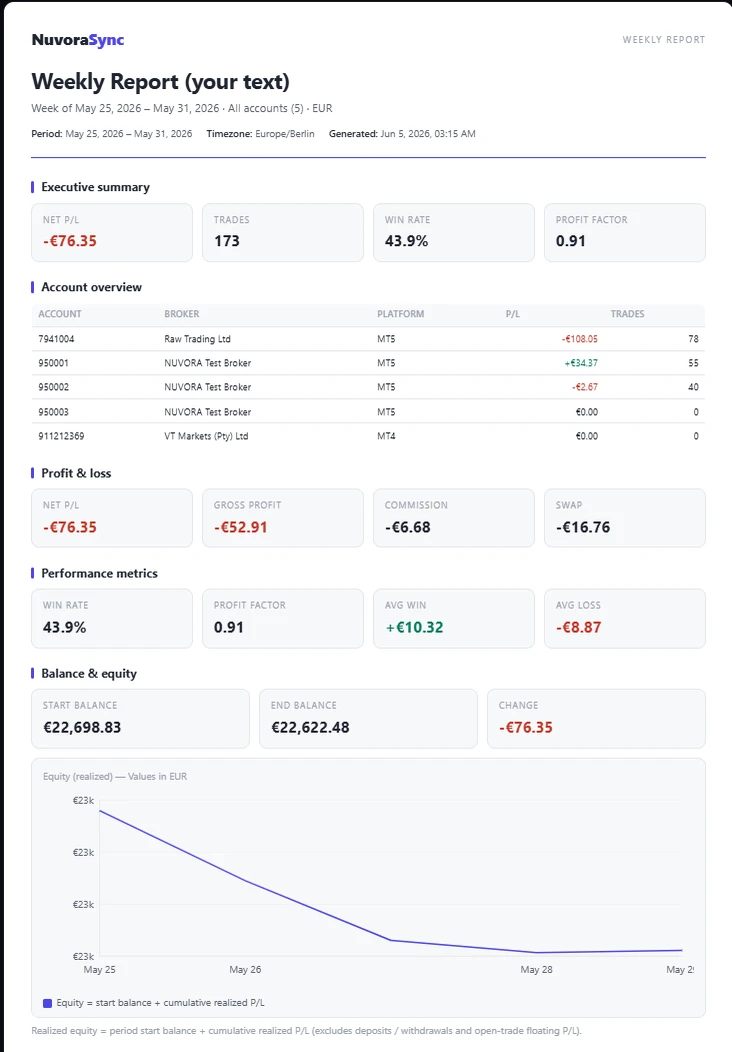
Automated PDF reports
Generate weekly, monthly or yearly reports with custom sections and delivery options.
- Download, email or Telegram delivery
- Custom report templates
- P/L calendar, charts and trade tables
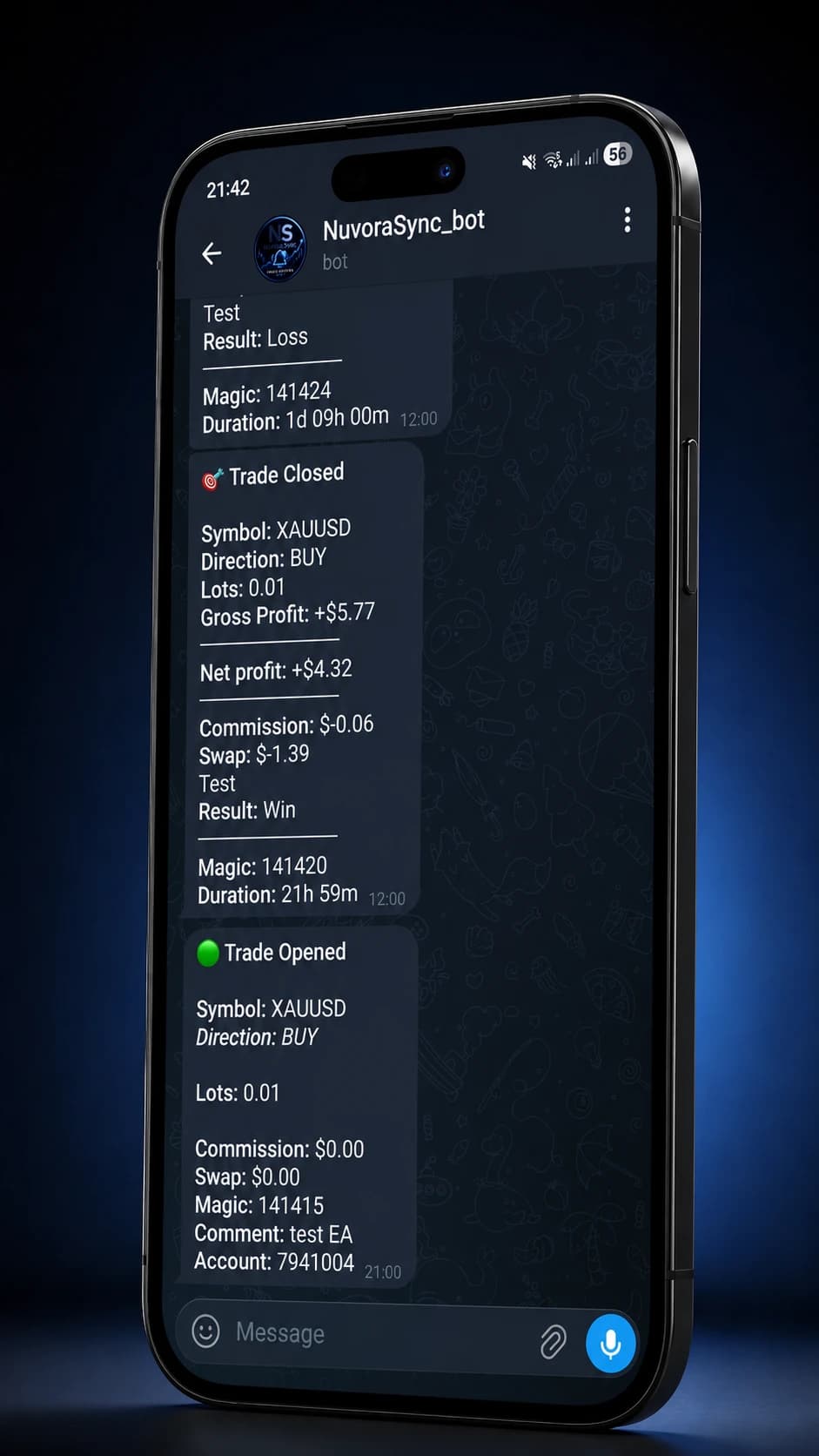
Telegram account activity notifications
Get notified in Telegram when your own MetaTrader trades open or close, plus your scheduled report deliveries.
- Custom message templates
- Separate report bot support
- Pro-gated delivery controls
How it works
From sign-up to insights in four steps
No new trading platform to learn. No data entry. Connect once and NuvoraSync does the rest in the background.
Create your account
Sign up with email or Google. Your data lives in its own row from the moment you register — no shared workspace, no shared trades.
Connect AutoSync
Drop the NuvoraSync EA onto your MetaTrader terminal. One token, no broker passwords — and you keep using the platform you trade from.
Let trades sync automatically
Trades, open positions, balance and equity flow in continuously. Free syncs every 60 minutes; Pro syncs every minute.
Analyze, review and improve
Use the dashboards, journal, EA analytics and Telegram notifications to spot what's working — and where you're leaking edge.
Educational guides for MetaTrader & forex
Clear, broker-neutral explanations of market structure, execution costs, backtesting and risk analytics. No signals, no advice — just how things actually work.
FAQ
Questions, answered
What is NuvoraSync?
NuvoraSync is a trading journal, analytics and reporting platform. It connects to your MetaTrader account and turns your trades into dashboards, analytics, a structured journal, EA insights and automated reports.
Which platforms does it work with?
MetaTrader 4 and MetaTrader 5. You add the NuvoraSync EA to your terminal once and AutoSync imports your history and keeps new trades, positions and balances up to date.
Does NuvoraSync place or close trades?
No. NuvoraSync is read-only — it analyses and journals your trading data. It never places, modifies or closes orders, and it is not investment advice.
Is there a free plan?
Yes. The Free plan includes AutoSync (60-minute interval), the performance dashboard, trade history, the full journal, calculators and account security. Pro adds 1-minute sync, Custom Dashboards, EA Analytics, Telegram notifications and scheduled reports.
Is my trading data private?
Yes. Your data is isolated to your own account with row-level security, and you control privacy and account-deletion settings. Two-factor authentication is built in.
Ready to take your trading seriously?
One dashboard. Every account. Real numbers. Real notifications.